 Net
NetSubmission Tracker
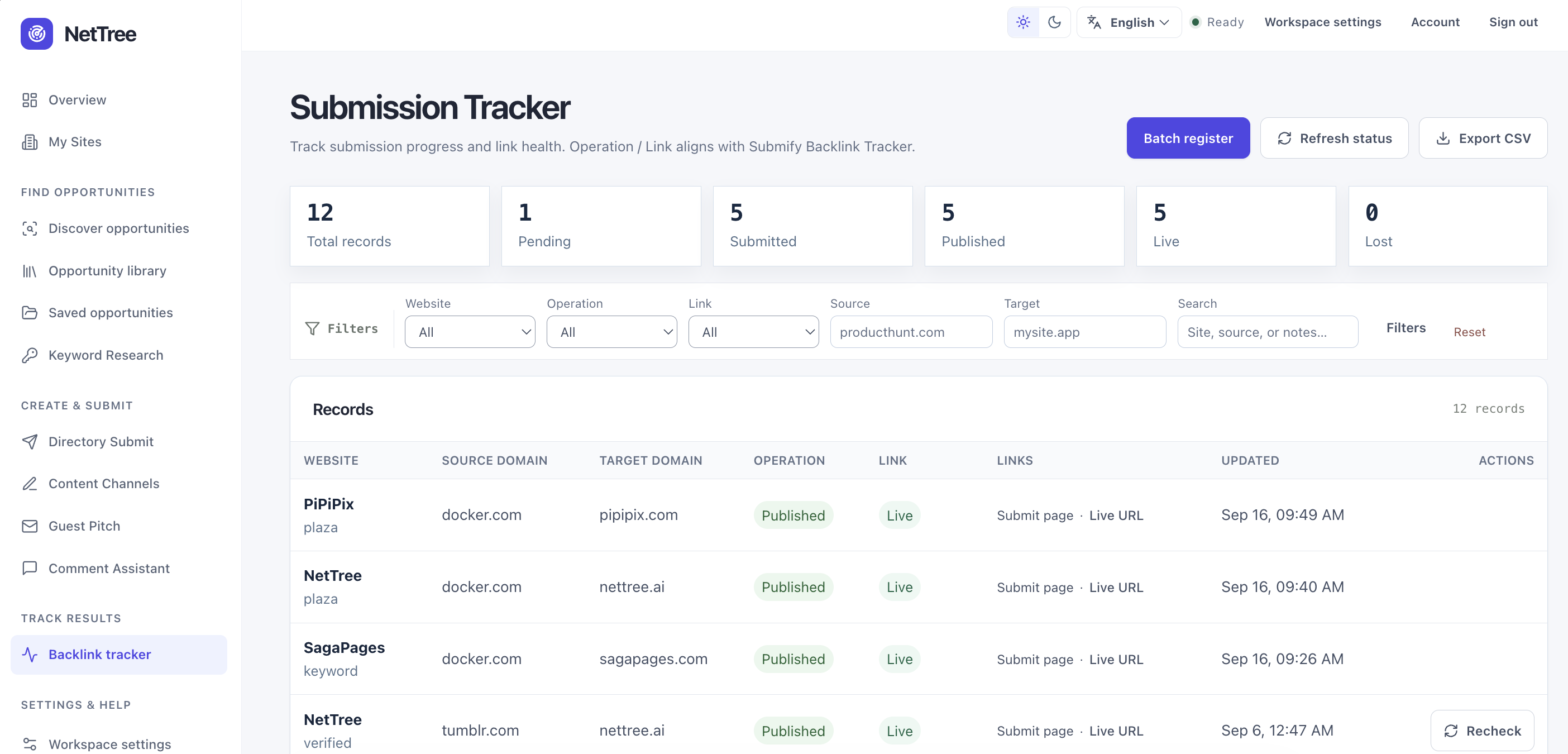
The Submission Tracker (/app/tracker) is NetTree’s operational view of outbound link work. It aligns with common backlink tracker patterns: Operation (what you did) and Link (whether the outcome is confirmed Live).
Who this is for
Operators who need one table to answer:
- What did we submit, and where?
- Is the link actually Live, still Checking, or Lost?
- Which URL is the submit page vs the public listing page?
What you will learn
- Column meanings and filters
- How queue rows and verified backlink rows merge
- Submit page vs Live URL
- When Recheck, Mark live, and Add live URL appear
- CSV import/export boundaries
Tracker layout
| Column | Meaning |
|---|---|
| Website | Your site (target property). Small label shows origin (e.g. plaza, verified). |
| Source domain | Destination root domain (directory, platform, etc.). |
| Target domain | Your site’s domain. |
| Operation | Your workflow stage: Pending, Submitted, Published, Rejected, Skipped. |
| Link | Outcome health: Unknown, Checking, Live, Lost. |
| Links | Submit page · Live URL (or Add live URL). |
| Updated | Last status or verification timestamp. |
| Actions | Context actions (Mark live, Recheck, etc.). |
Toolbar: Batch register, Refresh status, Export CSV.
Operation vs Link
These columns are independent:
| Operation | Typical meaning | Link | Typical meaning |
|---|---|---|---|
| Pending | Draft ready, not submitted | Unknown | No outcome yet |
| Submitted | You completed submit action | Checking | Awaiting verification or review |
| Published | Treated as live in queue | Live | Confirmed reachable link/listing |
| Published | Same | Lost | Was live; link disappeared or changed |
| Rejected / Skipped | Stopped pursuing | Unknown | N/A |
Published + Live is the success combination teams report externally — but only when Link is truly Live, not merely Mark live without evidence.
Conceptual background: Link verification and /verification.
Data flow: where Tracker rows come from
flowchart TB
  subgraph sources [Data sources]
    Q[site_source_queue]
    B[backlinks]
    O[owned_channels]
  end
  subgraph tracker [Submission Tracker]
    R[Merged record per site + source + target]
  end
  Q -->|user_status, notes, listing:| R
  B -->|source_url, status live/lost| R
  O -->|public_url on content platforms| R
Merge key: one row per site + source domain + target domain.
- Queue-only rows — from Plaza/workflow queue; Operation/Link derived from
user_status. - Verified rows — from
backlinksafter verification; origin showsverified. - Merged rows — queue + backlink combined; keeps queue ID, backlink ID, and best URLs.
Links column: Submit page vs Live URL
| Link label | Opens | Source priority |
|---|---|---|
| Submit page | Destination submission or editor entry | Submission endpoint → platform editor URL → homepage |
| Live URL | Page where your link/listing actually lives | listing: in notes → owned channel → verified backlink page |
Add live URL appears when a Live URL is missing but the row can be edited (queue or backlink ID present).
For content-publish platforms (Tumblr, Medium, GitHub, etc.), Submit page often points to the platform editor (e.g. create post), while Live URL is your public blog or repo page.
Actions: Recheck vs Mark live
| Action | When shown | What it does |
|---|---|---|
| Mark live | Queue item; Operation = Submitted | Sets queue user_status to Live (Published). Does not create a verified backlink by itself. |
| Recheck | Row has a backlink ID (verified path) | Re-runs link verification job on the stored backlink URL. |
| Refresh status (toolbar) | Always | Re-verifies up to 20 backlink rows in the workspace. |
| Add live URL | Links column | Saves listing URL to notes, backlink, and/or owned channel. |
| Record channel | Content-publish rows | Opens the content publish workflow to register an owned channel public URL. |
| Reopen | Skipped or Rejected queue rows | Returns the item to an active workflow state. |
Why identical Operation/Link but different actions?
Two rows can both show Published / Live but differ in data source:
| Origin label | Backlink record? | Recheck? |
|---|---|---|
plaza (queue Mark live) | Often no | No |
verified | Yes | Yes |
Same visible status; different evidence depth. For client reporting, prefer verified rows or add Live URL + run verification.

Record origins
| Origin | Meaning |
|---|---|
plaza | Added from public library / typical queue flow |
verified | Row tied to automated or recorded backlink verification |
| Other queue origins | Import, discovery, manual registration (as shown in UI) |
Filters and export
Filters: site, operation, link status, text search, source/target domain.
Export CSV: /api/tracker/export — includes resolved submit/listing URLs per row. Import CSV: creates or updates backlink records (infrequent backfill). Format documented on Tracker import panel.
Batch register
Path: /app/tracker/batch
For many draft_ready items (directory and similar workflows; not content-publish queue rows): select rows, optional listing URL per row, mark Submitted in bulk. Useful after a submission session with NetTree Assist.
Common questions
I Mark live but still no Recheck. Recheck requires a backlink verification record. Mark live updates the queue only. Register an owned channel or wait for verification to create a backlink.
Live URL shows “—” after I saved. Hard refresh the page. If Submit page and Live URL were identical (legacy data), update via Add live URL with the public listing path.
Lost vs Rejected? Rejected is a workflow decision to stop. Lost means a previously Live link failed recheck.
Does Tracker replace rank tracking? No. It tracks submission and verification evidence, not rankings or traffic.