 Net
NetLink libraries and queues
NetTree separates where sources live from what you commit to a site. Three layers work together for backlink source library management and directory submission list hygiene.
Who this is for
Operators curating destinations before running manual link building workflows — whether from NetTree’s curated Plaza or your own imported list.
What you will learn
- Public library (Plaza) vs private My Backlinks
- How items move into a site submission queue
- Queue statuses and workflow entry points
- Quick Open for batch submit-page launches
Three layers
| Layer | Path | Scope | Typical use |
|---|---|---|---|
| Public library (Plaza) | /app/plaza | Global curated sources | Discover directories and platforms |
| My Backlinks | /app/library | Workspace-private | Import CSV, internal lists, saved research |
| Site queue | /app/sites/[id]/queue | One site | Destinations you will actually pursue |
flowchart LR
  P[Plaza] --> Q[Site queue]
  L[My Backlinks] --> Q
  Q --> W[Workflows]
  W --> T[Submission Tracker]
Public library (Plaza)
Path: /app/plaza
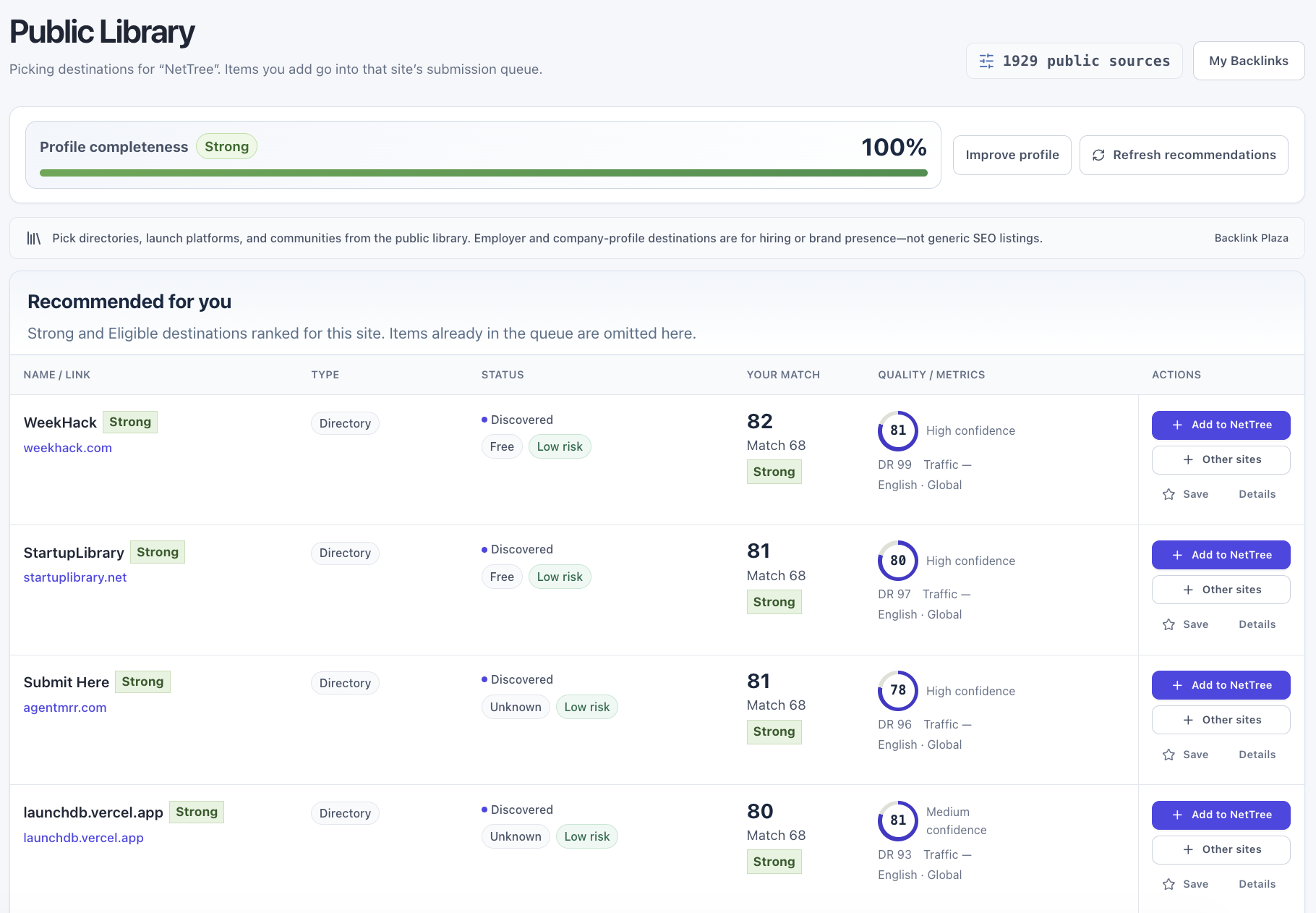
Plaza is NetTree’s product directory library — directories, launch platforms, communities, and content-publish destinations with fit signals and ops remarks.
What to review before adding
- Relevance — category, language, region vs your site profile
- Risk — payment, editorial gate, UGC policy
- Submission endpoint — whether a real submit URL exists
- Ops remark — curator notes (English where available)
- Platform type vs Interaction mode — Type classifies the destination; Interaction mode decides Directory vs Comment vs Guest workflow after add-to-site (reference)
Add to site queue
From a Plaza card, add the source to a site submission queue. The item enters queued or moves toward draft_ready once a workflow draft exists.
Free plans see 10 visible sources on Plaza (no pagination or filters). Paid plans unlock pagination, filters, and — on Pro/Business — personalized recommendations.
My Backlinks
Path: /app/library → /app/library/import
Your workspace-private link building source management layer:
- Sources visible only inside your workspace
- CSV import for historical lists or agency inventories
- Private notes without exposing strategy publicly
Imported sources can be added to any site queue the same way as Plaza items.
CSV import
Path: /app/library/import
Upload a CSV to bulk-add private sources. Required columns depend on the import panel template — typically domain, name, and optional notes.
Imported rows count toward maxPrivateSources on your plan. See Workspace settings — plans.
Site submission queue
Path: /app/sites/[id]/queue
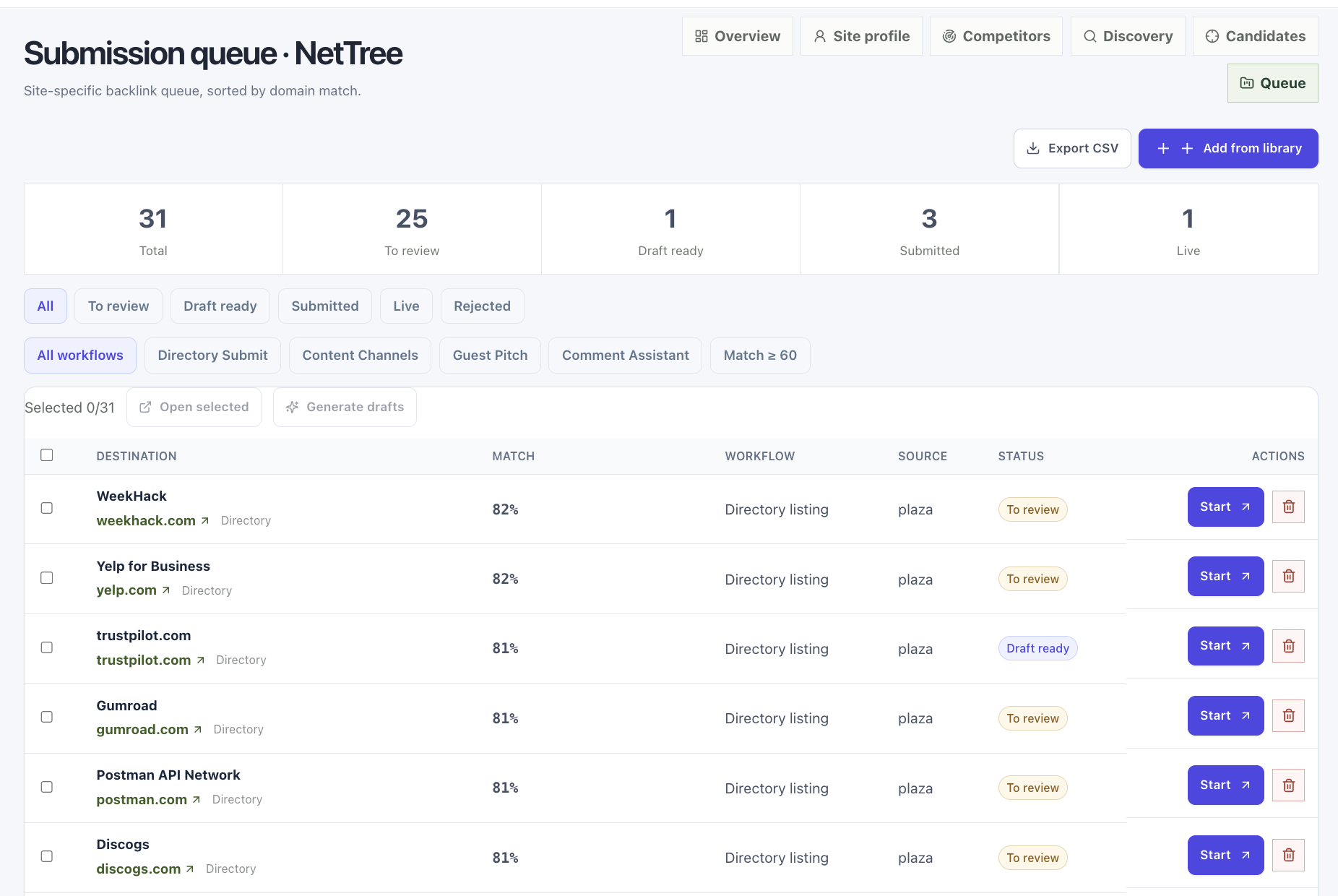
The queue is the commitment list for one site — every row is a destination you chose to pursue.
Queue statuses
| Status | Meaning | Tracker Operation (when visible) |
|---|---|---|
queued | Added; draft not started | Not in Tracker yet |
draft_ready | Draft prepared; ready to submit | Pending |
submitted | You marked submit complete | Submitted |
live | Treated as published/live in queue | Published |
rejected | Stopped pursuing | Rejected |
skipped | Deprioritized | Skipped |
Open a row to enter the matching workflow (directory, guest post, comment, or content publish).
Bulk actions
From the site queue toolbar you can:
- Open selected — open up to 10 submit/homepage URLs in new tabs
- Generate drafts — bulk AI draft generation for selected rows
To deprioritize a destination, use Skip inside a workflow workbench. Skipped rows may show Reopen in Submission Tracker.
Batch open from site queue
Path: /app/sites/[id]/queue
Select rows, then Open selected to launch up to 10 destination URLs in separate tabs. You still complete each submission manually on the third-party site.
This replaces a legacy Quick Open route; there is no standalone /app/quick-open page in the current app.
Public vs private visibility
| Data | Who sees it |
|---|---|
| Plaza source metadata | All NetTree users (public marketing previews on /opportunities) |
| My Backlinks entries | Your workspace only |
| Site queue + notes | Workspace members with site access |
| Tracker rows | Same workspace |
Common questions
Can I add the same domain twice? NetTree merges Tracker rows by site + source domain + target domain. Avoid duplicate queue rows for the same destination when possible.
I skipped a source — can I retry? Yes. Reopen from Tracker or restore from the site queue if still listed.
Where do admin “Link Source” fields appear? Curators maintain intelligence in admin; operators see user-safe Plaza cards and ops remarks — not internal scoring drafts.