 Net
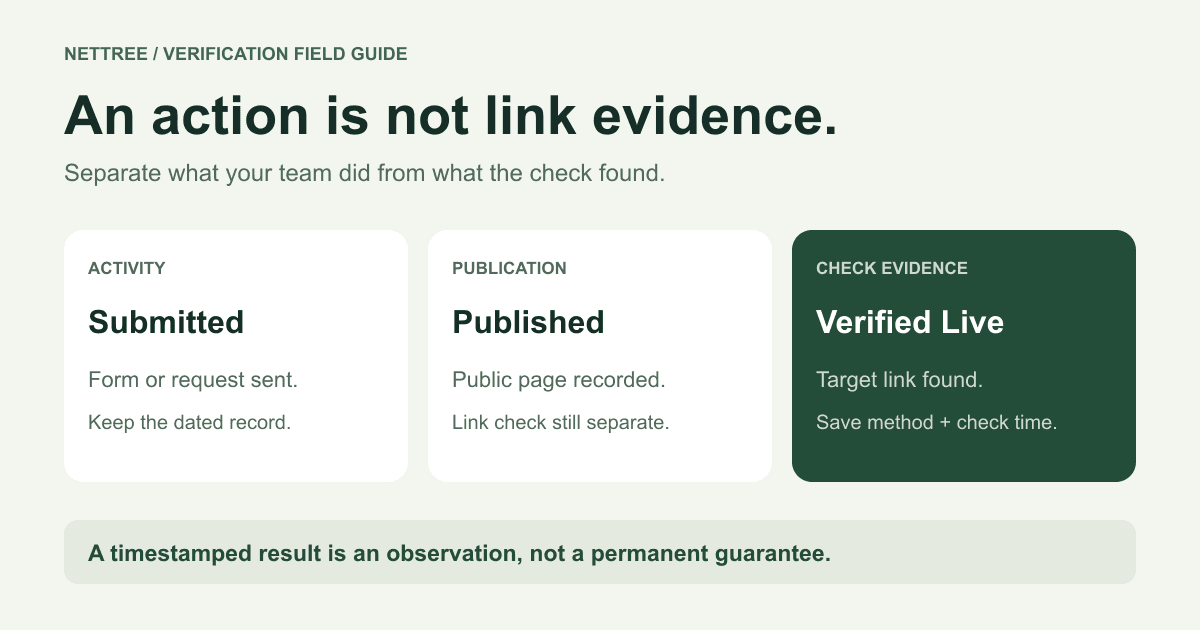
Submitted proves an action. Published records a publication milestone. Verified Live requires a separate check that finds the intended target link on the public page. To verify a backlink, open the exact source URL, inspect the link and its destination, then save the result, method, and check time. If access or evidence is incomplete, flag it for review.
This checklist is for agencies, SaaS marketers, and founders who need to audit link-building reports. It works with a spreadsheet or a verification tool. A live result is evidence at a particular time—not proof of indexing, traffic, ranking gains, or permanent placement.
Last updated: November 2, 2026. Reviewed against Google's technical guidance, NetTree's verification workflow, and the current checker implementation.
Start with two records, not one success label
A vendor's “delivered” label is ambiguous. It might mean a form was submitted, an editor accepted a request, or a link appeared publicly. Agree on the evidence required for each milestone before counting results.
Keep the submission or publication record separate from the backlink check result:
| Record | Label | Evidence required |
|---|---|---|
| Activity | Submitted | A dated submission or outreach record |
| Publication | Published | The exact public page URL and publication confirmation |
| Backlink check | Verified Live | A check finding the intended target link, with method and timestamp |
| Backlink check | Lost | A negative result requiring inspection; confirm actual loss before reporting removal |
| Backlink check | Checking / review needed | Pending, incomplete, or ambiguous evidence |
For reporting, call a link confirmed lost only when prior evidence shows it existed and a follow-up establishes that it no longer meets the agreed criteria. A first check that finds nothing does not establish a historical loss. Tool labels may be broader: a fetch failure can produce a negative status without proving that a publisher removed anything.
In NetTree, Mark published records the operation; Add live URL saves an address. Neither action itself runs verification. The verification guide explains how those records relate to the Tracker Link column.
The backlink verification checklist
Use these six steps for each claimed placement. Keep a short explanation whenever the evidence does not support a simple pass.
1. Open the exact public source page
Ask for the listing or article URL, not the publisher's homepage, a submission receipt, or an admin preview. Open it while signed out where possible. A page visible only to its submitter is not evidence of a public placement.
Record the URL you requested and the page where you arrived. If a redirect leads to a different URL, inspect that destination. A publisher changing a listing's address does not necessarily mean the backlink disappeared.
A successful HTTP response is only the start. Google's HTTP status documentation explains that a 2xx response does not guarantee indexing and that an error-like page can be a soft 404. Read the content: a “listing removed” page returning 200 is not a valid product listing.
2. Find an actual link, not just a brand mention
Locate your product or brand, then inspect the website link. A plain-text URL, logo without a link, or screenshot of your homepage does not establish a clickable backlink.
Google's crawlable-link guidance recommends an <a> element with an href pointing to a resolvable address. A click handler alone is not equivalent evidence. Links inserted with JavaScript can be crawlable when they use appropriate anchor markup, but a checker that reads only the fetched HTML may miss them.
For an ambiguous result, inspect the browser's rendered page as well as the fetched markup. Record which method found the link rather than treating those observations as identical.
3. Confirm the intended target and redirect destination
A link to your homepage is not automatically a valid substitute for a contracted product-page link. Agree on the target before verification.
Compare the actual href with that target and check where following it lands. If a publisher uses an outbound tracking URL, record both the intermediary and final destination. A direct-link checker may miss that placement even if the browser reaches the right page.
Decide which URL variations are acceptable. A trailing slash or tracking parameter may be harmless, while a different product path or a query parameter selecting another resource may be material. Do not use “same domain” as a substitute for checking the intended page.
Keep target availability separate from link presence. A source can contain the correct link while your destination returns an error; the backlink exists, but the visitor journey still needs repair.
4. Record link attributes, anchor text, and placement
Save the anchor text, location on the page, and actual rel values. Common values include nofollow, sponsored, and ugc; a link may have more than one. If none are present, record that fact rather than inventing a dofollow HTML attribute.
Google's outbound-link guidance prefers sponsored for paid placements, accepts nofollow for that purpose, and recommends ugc for user-generated links. These describe link relationships; they do not prove commercial results.
Separate two decisions: Was the link found? and Does the placement meet the agreement? A nofollow link can be present even if an agreed deliverable required different treatment. Conversely, a link without qualifying attributes does not establish that Google will credit it.
5. Save dated evidence and an explanation
Attach the source URL, target URL, check time, method, result, and a short note. Use a timestamp with a timezone, such as an ISO 8601 UTC timestamp, so colleagues can compare checks reliably.
A screenshot can show the page context, but it should accompany the URLs and inspection note. A screenshot alone usually cannot establish the actual href, redirect chain, or link attributes. Preserve previous evidence when a later check disagrees instead of rewriting the earlier result.
6. Assign an owner and next action
Every unresolved row needs someone responsible for it. Give that person a concrete next step: retry after a temporary failure, inspect the rendered page, confirm a moved URL, or request a publisher correction.
If the evidence passes, record when it should next be reviewed. If it does not, preserve the observation and explain what remains unknown. A complete audit trail includes uncertainty rather than hiding it inside a “delivered” total.
What to do when a check fails
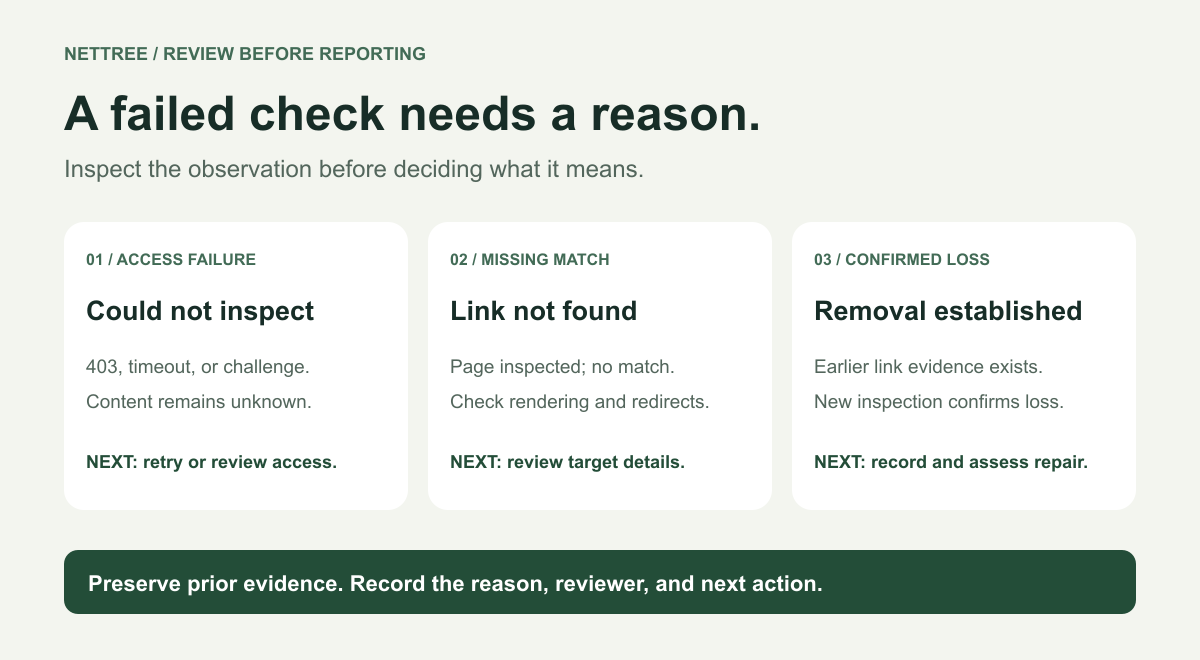
A failed fetch, missing match, and confirmed removal are different observations. Use this troubleshooting table before escalating a result to a client or publisher.
| Observation | What it establishes | Next action |
|---|---|---|
| Source returns 404 or 410 | That requested page is unavailable at check time | Check for a replacement URL; compare with prior evidence |
| Source returns 403, times out, or presents a challenge | The checker could not inspect it reliably | Flag access failure; retry or inspect in a permitted browser session |
| Page loads, but no matching link is found | That inspection did not find the expected target | Check the target, rendered page, pagination, and possible tracking redirect |
| Page redirects to a new listing containing the link | The original address moved and a link is still observable | Save both URLs and recheck the final listing |
| Brand appears without a clickable link | A mention exists, but the requested backlink is unproven | Report the mention separately; request a correction if appropriate |
| Prior evidence shows a link; a new inspection confirms its removal | Evidence supports a confirmed loss | Record the change and decide whether recovery is worth pursuing |
A login wall or geographic restriction can make an inspection inconclusive. Describe the access condition rather than asserting that every visitor sees the same thing. Do not bypass platform access rules to close an audit row.
The minimum evidence pack for a placement
Make the report usable by someone who did not perform the submission. These are recommended audit fields, not a claim that every tool stores all of them automatically.
| Field | What to record |
|---|---|
| Public source URL | Exact listing or article URL, plus final source URL if moved |
| Intended target URL | Agreed destination; note acceptable URL variations |
| Activity dates | Submitted date and publication date, when known |
| Check time and method | Timestamp with timezone; fetched HTML, browser inspection, or both |
| Link details | Actual href, anchor, rel values, and relevant redirect destination |
| Result and explanation | Link found, not found, or inconclusive; explain exceptions |
| Follow-up | Reviewer, next action, and next review date |
| Supporting evidence | Dated screenshot, saved excerpt, or tool result where useful |
Download NetTree's acceptance CSV worksheet for the core records. Add method, owner, and redirect details to the verification note or your own columns. The worksheet is for recordkeeping; it is not the Tracker import format.
Do not invent missing publication dates. If a page was first observed on a particular day, label that date “first observed,” rather than claiming you know when it was published.
How to audit a vendor report without inflating results
First, agree on what the vendor is being paid to deliver. Research, submission, publication, and verified placement can all be legitimate milestones. They require different evidence.
Request a source URL, intended target, dates, and dated check evidence for every placement claimed as live. Count placements by the agreed unit—for example, unique source-page and target-page pairs—rather than counting multiple rows, screenshots, or rechecks as additional acquisitions.
For small reports, inspect every claimed placement. For a large report, document any sampling approach and label the remainder unreviewed; a sample does not verify every row. If all placements must satisfy an acceptance requirement, sampling alone does not complete that review.
Worked example: three “delivered” rows
The following scenario is illustrative, not a real customer case or a measured success rate.
| Vendor row | Audit observation | Appropriate report |
|---|---|---|
| A: submission confirmation email | No public listing URL is available | Submitted; publication and backlink not verified |
| B: public product profile | Intended link found; attributes and check time recorded | Published; backlink verified at that time |
| C: page returning 403 to the checker | Page content could not be inspected | Verification inconclusive; access review required |
The report contains one checked placement, one submission without publication evidence, and one unresolved check. It does not support “three live backlinks.” If row C had previously passed a check, retain that earlier result alongside the current access failure.
If a placement falls short, ask for the specific correction or evidence needed. Avoid turning “not verified” into an allegation that the vendor fabricated it; the report may simply lack sufficient proof.
How often should you recheck backlinks?
Set a cadence based on importance, reporting commitments, and check budget. There is no universal interval supported by this guide. The schedule below is a suggested operating policy, not an industry benchmark or a default NetTree automation.
| Situation | Suggested next check |
|---|---|
| Newly published placement | Verify before first counting it in a results report |
| Access failure or ambiguous match | Assign a prompt manual review or retry appropriate to the failure |
| Placement included in a recurring client report | Recheck within the reporting window you have agreed |
| Important evergreen listing | Put it on a periodic review schedule and revisit after known changes |
| Abandoned or low-priority placement | Reduce monitoring effort unless a contract requires it |
A checked date matters as much as the status. “Verified last quarter” and “verified for this month's report” communicate different evidence. Avoid presenting an old observation as a current guarantee.
Budget for repeat checks separately from new acquisitions. For example, with 10 available checks, checking six new records and rechecking four existing ones uses the allowance; it does not represent 10 new backlinks. This is illustrative check allocation, not an expected yield.
What NetTree checks—and what still needs judgment
NetTree separates submission and publication records from backlink results. A typical flow is to record the public source URL and intended target, create or import a backlink record in Tracker, run a check, then inspect the result and timestamp. Recheck applies to existing backlink records. See how NetTree works for the broader workflow.
The current checker reads fetched HTML and looks for a matching anchor. It does not fully execute a page like a browser or follow every outbound tracking link. Its matching also normalizes some URL differences, so inspect query-dependent targets and destination behavior when those details matter to acceptance.
An automated Lost label can reflect an HTTP or network failure. Inspect the check note before reporting a confirmed removal. Browser-visible links, tracking redirects, and incomplete responses can require human review. Neither manual publication confirmation nor a status label replaces that evidence.
As listed on NetTree pricing when reviewed on November 2, 2026, Free includes 10 link checks per month. Rechecks use the same allowance. If this workflow fits your team, start a free workspace and apply the checklist to a small set of records first.
NetTree does not auto-submit. For the steps before verification, use the directory submission guide.
FAQ
Can a Published listing have an unverified backlink?
Yes. A public profile can exist without the intended link, or its link may not have been checked yet. Publication and link presence need separate evidence.
Does nofollow mean the backlink is not live?
No. Presence and link treatment are separate observations. Record the attribute and evaluate whether the placement meets your agreed criteria.
Does Lost always mean the publisher deleted my link?
No. A checker can report a negative status because of access failures or incomplete inspection. Confirm the reason and compare previous evidence before reporting removal.
Does Verified Live prove indexing or SEO value?
No. It establishes a matching link was found at the check time. Indexing, search performance, referral visits, and conversions require separate evidence.
Is a screenshot enough to accept a placement?
Use it as supporting context. Keep the public source URL, intended target, actual link details, method, and check time so another reviewer can assess the claim.